
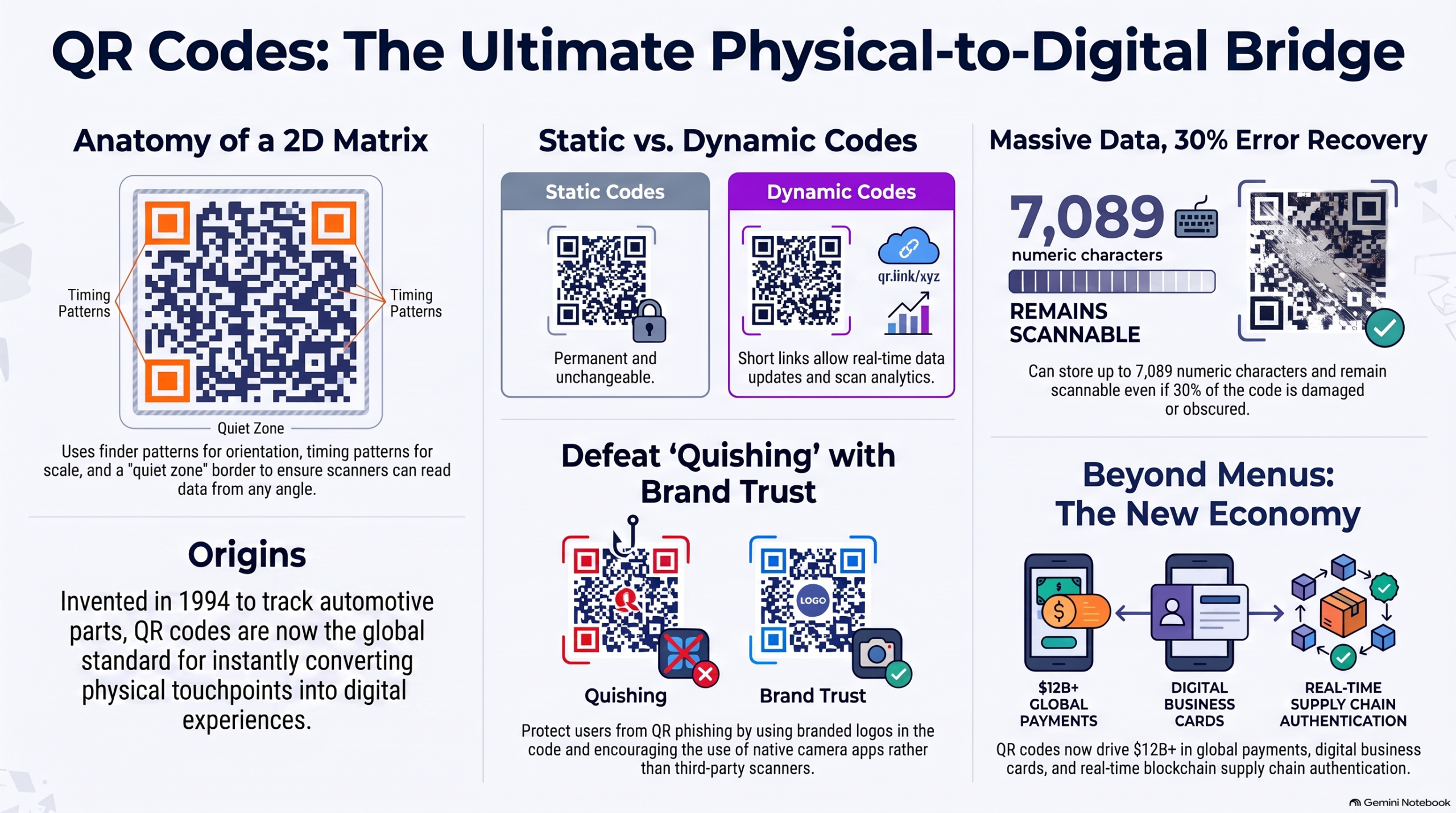
Quick Response codes, generally known as QR codes, are almost everywhere in our daily lives. Whether you’re scanning a payment link at a restaurant, checking product information at a supermarket, or joining a Wi-Fi network at a café, it’s the quick thing to scan and do the needful.
But what’s actually happening behind the scenes when you point your phone camera at those black and white squares? How does your device or the app instantly decode information from a seemingly random pattern? Let’s know a little more about the QR code technology and understand how they’ve become the bridge between offline and online experiences.
What is a QR Code?
A QR code is a two-dimensional (2D) matrix barcode that stores data in a compact and scannable format. Before the QR codes got popular, we were already familiar with the traditional one-dimensional barcodes that were present on most of the grocery items packs. But those codes were one dimensional, meaning you could only scan them horizontally. QR codes can be read both horizontally and vertically, allowing them to encode more information in lesser space.
Key Characteristics:
- Two-dimensional matrix: Contains rows and columns of modules (individual squares).
- High data density: Can store thousands of characters.
- Error correction: It has built-in redundancy to recover data even if the code is damaged.
- Offline capability: Can be decoded without internet connectivity.
- Versatile encoding: it supports text, URLs, contact information, Wi-Fi credentials, payments, and much more.
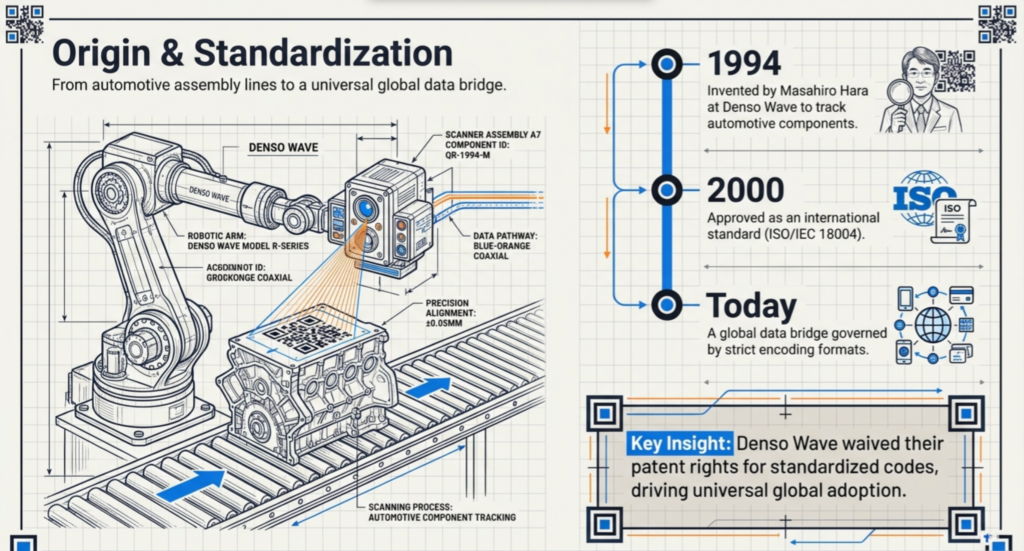
QR codes were invented in 1994 by Masahiro Hara, an engineer at the Japanese company Denso Wave. It was built as a solution to track components in automotive manufacturing.
Understanding QR Code Structure
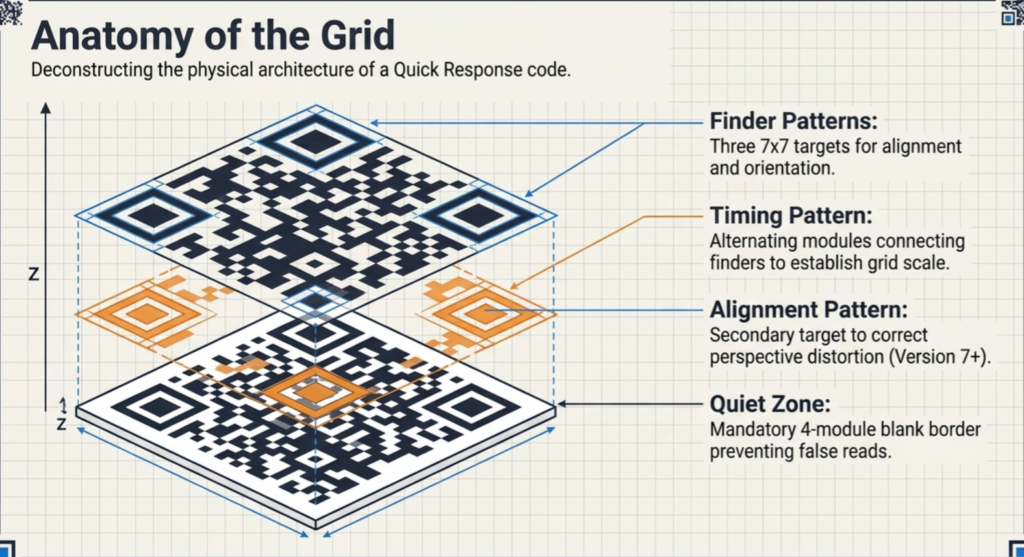
A QR code consists of several distinct components, each serving a specific purpose in encoding and decoding data.
The Three Position Markers (Finder Patterns)
The three corners of the QR code located at upper left, upper right, and lower left are called the finder patterns. They are distinctive 7×7 module squares used for alignment and orientation detection. These patterns appear as a square within a square within another square, resembling a crosshair target. Using these position markers, the scanners locate the QR code in an image, establish its correct orientation, and figure out where the actual data begins.
The Timing Pattern
The timing pattern is a series of alternating black and white modules running horizontally and vertically through the QR code. Imagine it like a chessboard that helps the scanner figure out the actual size of each module and establish a precise grid alignment. Without this pattern, the scanner cannot determine if it’s looking at a small QR code or a zoomed-in portion of a larger code.
The Alignment Pattern
For larger QR codes (versions 7 and above), a small alignment pattern near the bottom-right corner helps the scanner compensate for a probable perspective distortion that may occur when scanning QR codes at angles. This helps in accurate decoding of the code when it isn’t perfectly square to the camera.
Format Information
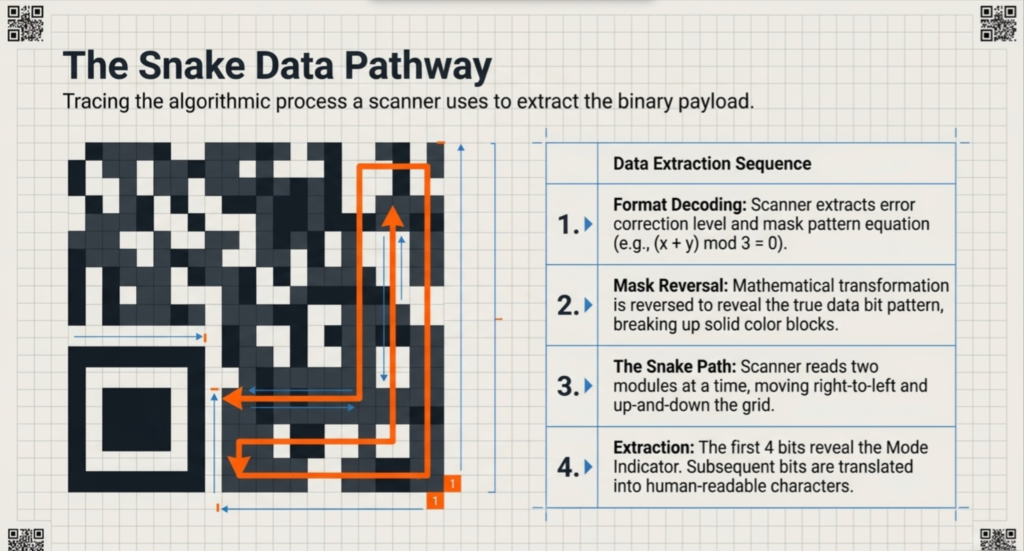
The format information area stores critical metadata about the code itself: the error correction level and mask pattern used. This tells the scanner how to interpret the data and how much redundancy was added for error recovery.
Version Information
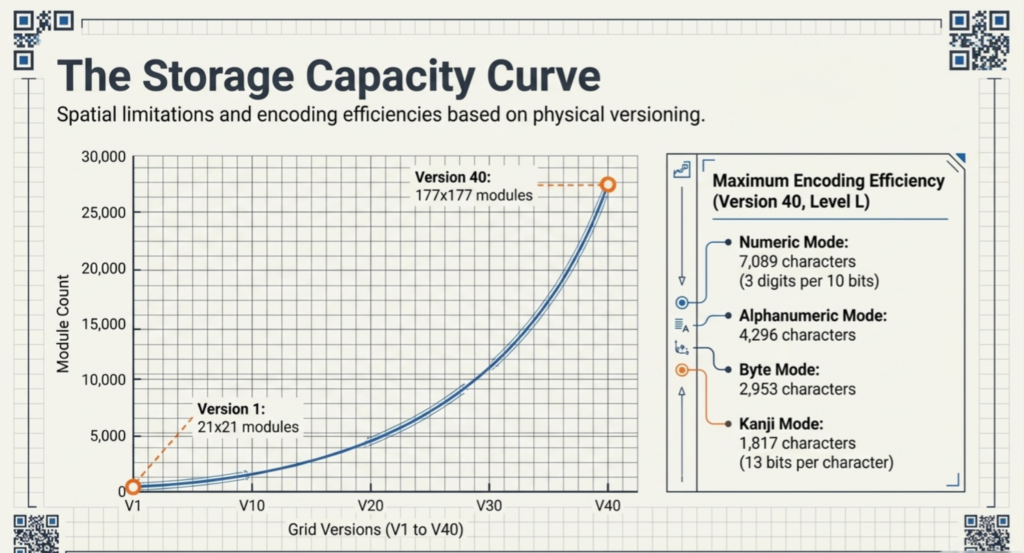
The version information states which of the 40 possible QR code versions is being used. Versions range from 1 (the smallest, 21×21 modules) to 40 (the largest, 177×177 modules). Only versions 7 and above QR codes include explicit version information, the versions 6 and below use the format information space for additional data.
The Quiet Zone
Surrounding the entire QR code is the quiet zone—a blank border of at least 4 modules on all the sides. This white space helps the scanners identify where the QR code begins and where it ends, preventing false reads and improving accuracy.
The Data Segment
The remaining area, is the actual data segment. This is where the encoded information is embedded, along with error correction codewords that facilitates recovery from damage or distortion.
How Data Gets Encoded into QR Codes
The process of converting human-readable information into the binary format is called encoding. The process involves several steps in a sequential way as explained below.
1. Data Analysis Phase
The encoder first analyzes the input data and determines the most efficient encoding mode:
- Numeric mode: For digits 0-9 only (most efficient: 3 digits per 10 bits)
- Alphanumeric mode: For uppercase letters A-Z, digits 0-9, and some specific symbols (11 bits per 2 characters)
- Byte mode: For any character including lowercase letters and special characters (8 bits per character)
- Kanji mode: For Japanese Kanji and Kana characters (13 bits per character)
2. Data Conversion
The data is then converted into a sequence of bits. Each character is represented as a binary pattern according to the encoding mode specifications.
3. Error Correction Code Generation
One of the most crucial steps of QR code generation is the addition of error correction data using the Reed-Solomon algorithm. This is a mathematical process that creates redundant codewords that encode information multiple times in different forms. If the scanner can’t read certain modules due to damage or distortion, it is able to reconstruct the the original data from the remaining information.
The error correction level determines how much redundancy is added:
- Level L: 7% error recovery (least space for error correction)
- Level M: 15% error recovery
- Level Q: 25% error recovery
- Level H: 30% error recovery (most space for error correction)
4. Module Placement
The encoded data and error correction codes are embedded in the QR code grid in a specific pattern. While scanning, the scanner typically starts at the bottom-right and moves in a zig-zag pattern upward and leftward, reading two modules at a time.
5. Masking
If a QR code contains large blocks of same color, it may be hard for the scanner to scan. To handle this issue a mask pattern is applied. This mathematically transforms the data bit pattern to create better visual distribution while maintaining the scanner’s ability to reverse the process and obtain the original data.
Visual Representation of QR Code Capacity
To illustrate how version and encoding mode affect storage capacity, consider this breakdown:
As shown above, higher QR versions exponentially increase data storage. Version 1 can hold just 41 numeric characters, while Version 40 holds 7,089. The encoding mode also dramatically impacts capacity—numeric data is three times more efficient than Kanji encoding.
How QR Code Scanning Works (The Decoding Process)
Step 1: Image Capture
Your phone’s camera captures the image of the QR code. The quality of the image captured directly impacts process of successful decoding. Modern smartphone cameras are mostly optimized for this task.
Step 2: Position Marker Recognition
The scanner searches the image and identifies for the three finder patterns. Once it successfully identifies these distinctive 7×7 squares, it determines:
- The physical location of the QR code within the image.
- The orientation of the code.
- The approximate grid alignment.
Step 3: Timing Pattern Analysis
The scanner locates the timing patterns which are the alternating black-white lines and uses them to calculate the exact size of each module. This is an important step because it helps the scanner to determine the precise grid dimensions and which QR version is being read.
Step 4: Data Extraction
From the bottom-right corner, the scanner moves in a zig-zag pattern considering two modules at a time, moving right-to-left and up-and-down to extract all the binary data from the QR code.
Step 5: Format Information Decoding
The scanner reads the extracted information to determine:
- The error correction level used.
- The mask pattern applied to the data.
With this information, it reverses the mask to recover the original data pattern.
Step 6: Mode and Length Decoding
The first bits read are the mode indicator (4 bits), which tells the scanner what type of data is encoded (numeric, alphanumeric, byte, or Kanji).
The next bits are the character count indicator, which reveals exactly how many characters are encoded.
Step 7: Data Decoding
After determining the data type and length, the scanner converts the bit sequence back into readable characters using the appropriate decoding rules for the selected mode.
Step 8: Error Correction Verification
The scanner processes the error correction codewords to check for and correct any bit errors detected during reading. Even if some modules were misread due to damage or distortion, the Reed-Solomon algorithm can reconstruct the original data.
Step 9: Final Interpretation
After the data is successfully decoded and error-corrected, the scanner interprets it:
- If it’s a URL, the browser opens it.
- If it’s contact information, it suggests saving it.
- If it’s a payment code, it launches the payment app.
- If it’s plain text, it displays it.
Error Correction: The Reed-Solomon Algorithm
One of the most critical aspects of QR code technology is how gracefully it handles damage and degradation. The Reed-Solomon error correction algorithm is the key to this.
How Reed-Solomon Works
Reed-Solomon codes treat the data as a polynomial. The encoder calculates additional “parity symbols” that represent unique points on this polynomial. If any data is lost or corrupted, the decoder can reconstruct the original polynomial and recover all lost information, provided that at least a certain number of points remain intact.
For Example: If you have a line defined by two points, you can reconstruct the entire line even if you only see one point and some corrupted data. The error correction data provides these additional points.
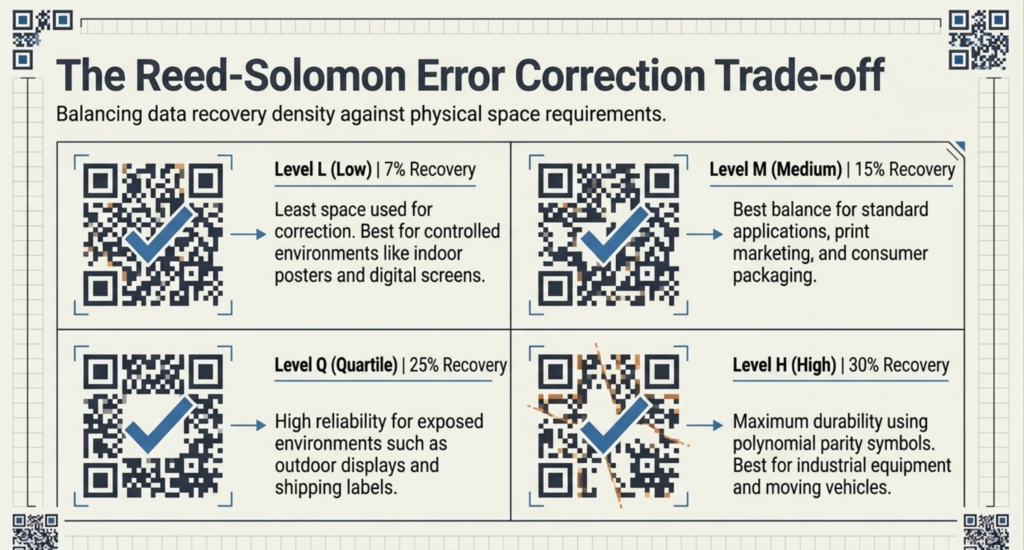
The Four Error Correction Levels Explained
The choice of error correction level represents a critical trade-off:
Level L (Low) – 7% recovery
- Most economical use of space.
- Suitable for controlled environments (printed documents, QR codes indoors).
- Example: A URL on a poster inside a building
Level M (Medium) – 15% recovery
- Best balance for most applications.
- Suitable for marketing and packaging.
- Example: Product packaging, promotional materials.
Level Q (Quartile) – 25% recovery
- High reliability for outdoor or exposed applications.
- Suitable for public displays, shipping labels.
- Example: QR codes on outdoor billboards or delivery packages.
Level H (High) – 30% recovery
- Maximum durability for harsh environments.
- Suitable for items with expected wear and tear.
- Example: QR codes on moving vehicles, industrial equipment.
Practical Code Examples
Generating a QR Code with Python
Python’s qrcode library makes QR code generation straightforward:
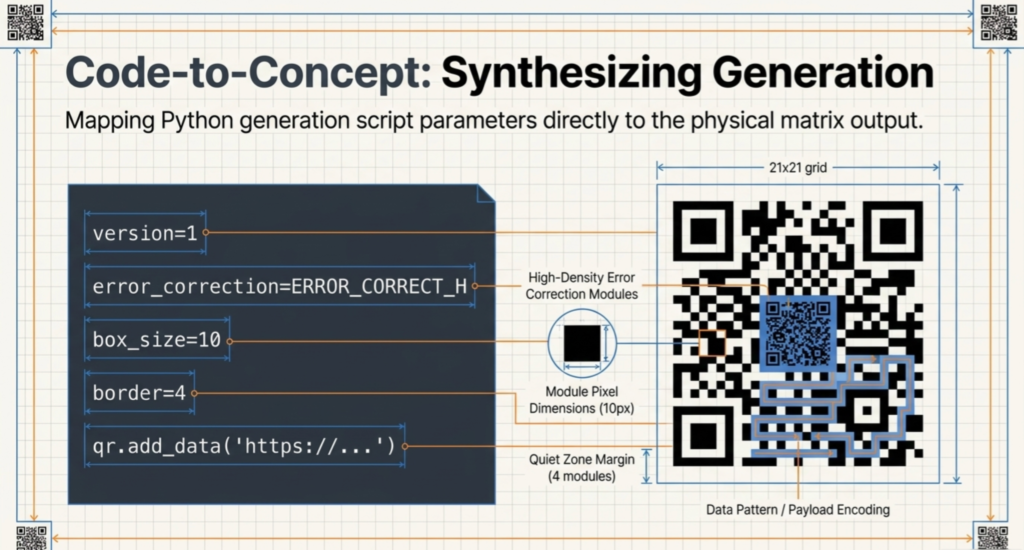
This code creates a QR code for a website URL with high error correction, automatically sizing the version to fit the data.
import qrcode
from PIL import Image

 # Create QR code instance
 qr = qrcode.QRCode(
     version=1,           # Version 1 (21x21 grid)
     error_correction=qrcode.constants.ERROR_CORRECT_H,  # High error correction
     box_size=10,         # Size of each module in pixels
     border=4,            # Border size (quiet zone)
 )

 # Add data
 qr.add_data("https://www.example.com")
 qr.make(fit=True)

 # Create and save image
 img = qr.make_image(fill_color="black", back_color="white")
 img.save("qr_code.png")

 # Display the QR code
 img.show()
Generating a QR Code with JavaScript
For web applications, qrcode.js library provides simple generation:
xml
<!DOCTYPE html>
<html>
<head>
    <script src="https://cdnjs.cloudflare.com/ajax/libs/qrious/4.0.2/qrious.min.js"></script>
</head>
<body>
    <h1>QR Code Generator</h1>
    <input type="text" id="qrContent" placeholder="Enter text or URL">
    <button onclick="generateQR()">Generate QR Code</button>
    canvas id="qrcode"></canvas>
    <script>
        let qrInstance;
        function generateQR() {
            const content = document.getElementById("qrContent").value;

            if (content.trim() === "") {
                alert("Please enter some content");
                return;
            }
            // Create or update QR code
            qrInstance = new QRious({
                element: document.getElementById("qrcode"),
                value: content,
                size: 300,
                level: "H",          // High error correction
                mime: "image/png"
            });
        }
    </script>
</body>
</html>
This creates an interactive web-based QR code generator with real-time updates.
Real-World Applications and Use Cases
QR codes now serve diverse industries beyond manufacturing:
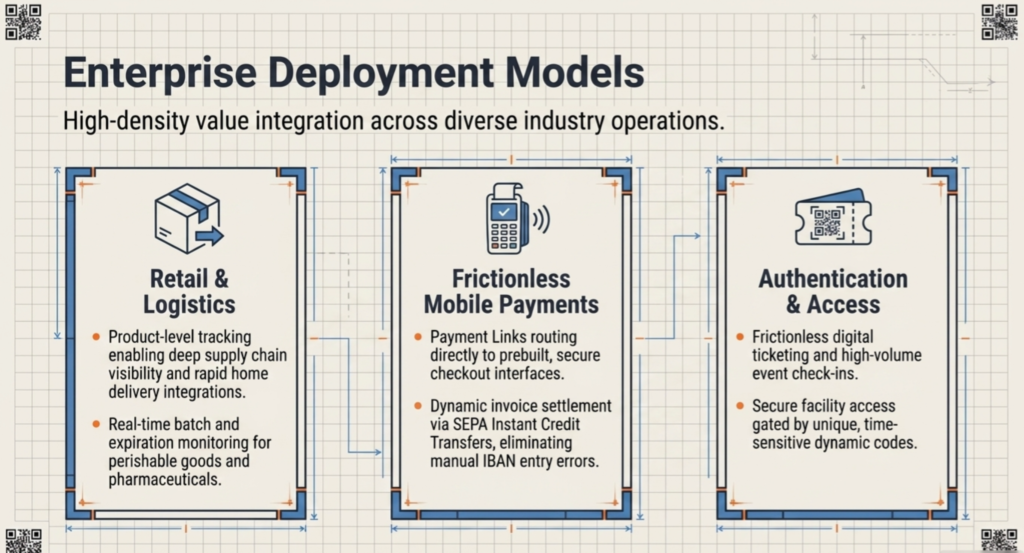
Retail and E-Commerce
Modern retailers use QR codes extensively for:
- Self-checkout systems: Scan items as you shop (Walmart’s Scan & Go).
- Virtual shopping: Commuters scan codes in subways to add products to shopping carts (Tesco Virtual Store, South Korea).
- Product information: Detailed product specs, reviews, and prices on demand.
- Digital price tags: Dynamic pricing that updates instantly across stores.
- Loyalty programs: Easy enrollment and transaction tracking.
Alibaba’s Hema Fresh stores feature QR codes on every product, enabling 30-minute home delivery integration with their e-commerce platform.
Mobile Payments
QR-based payments account for over 60% of in-store transactions in Asia and are growing globally:
- Restaurant payments: Customers scan at tables instead of waiting for bills.
- Retail checkout: Contactless payment at point of sale.
- Peer-to-peer transfers: Instant fund transfers between individuals.
- Invoice settlement: Dynamic QR codes in business invoices enable instant A2A payments.
Deutsche Bank uses dynamic QR codes in invoices for SEPA Instant Credit Transfers, eliminating manual IBAN entry.
Supply Chain and Inventory Management
QR codes provide real-time visibility across the entire supply chain:
- Product tracking: From manufacturer to end consumer.
- Batch and expiry tracking: Critical for perishables and pharmaceuticals.
- Inventory updates: Real-time stock level synchronization.
- Logistics automation: Streamlined shipping and receiving processes.
Product Authentication and Anti-Counterfeiting
Luxury goods, pharmaceuticals, and consumer products use QR codes to prevent counterfeiting:
- Unique identification: Each product gets a unique QR code.
- Blockchain integration: Some systems link QR codes to blockchain for product provenance.
- Geolocation verification: Track where products are scanned to detect suspicious patterns.
Event Management and Ticketing
- Digital tickets: Event admission without printing.
- Check-in systems: Instant verification and attendance tracking.
- Security: Unique codes prevent ticket duplication.
- Analytics: Understand attendee flow and preferences.
Restaurant and Hospitality
- Contactless menus: Digital menus updated in real-time.
- Ordering systems: Direct ordering and payment from table.
- Check-in: Streamlined reservations and guest tracking.
QR Code Security: Best Practices and Vulnerabilities
Although QR technology is highly effective and popular, it does have specific security vulnerabilities that creators and users should understand and be aware of.
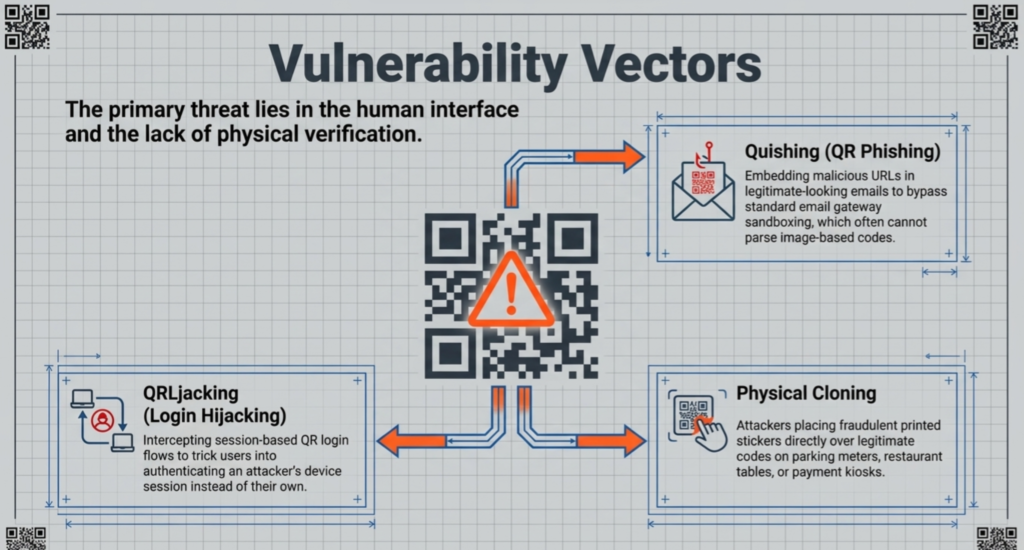
QRishing (QR Phishing)
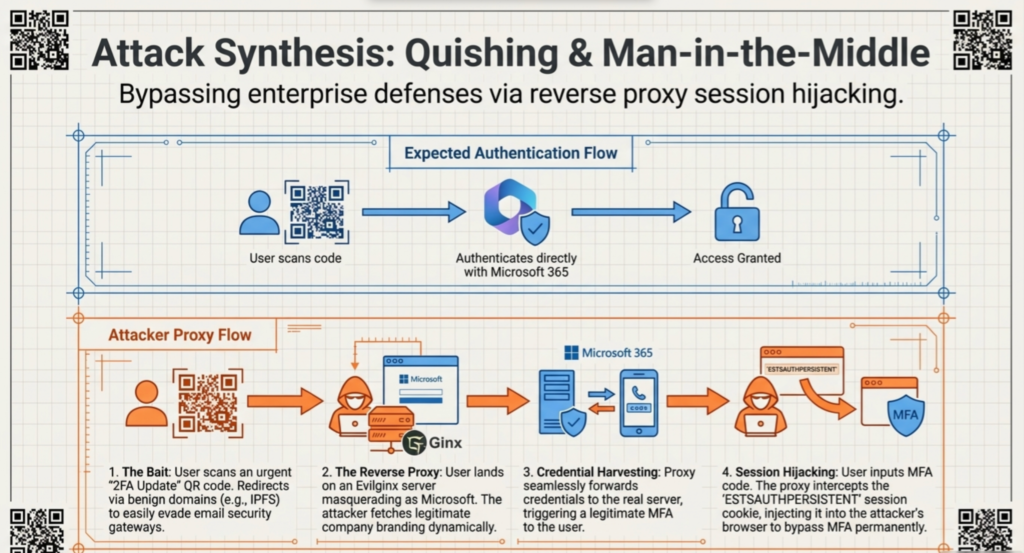
Attackers replace legitimate QR codes with malicious ones that direct users to phishing websites or download infected apps. This works particularly because users trust the initial scan without verifying where they’re being directed to.
URL Shortening Abuse
Shortened URLs (like bit.ly) can mask the true destination and thus making it impossible to verify a URL before scanning.
Code Manipulation
QR codes can be easily printed and physically replaced, attackers can paste a new code over a legitimate one. A code on a billboard or parking meter might be compromised without the owner’s knowledge.
Data Leakage
Static QR codes containing sensitive information (passwords, tokens) pose risks if captured or archived. Attackers with access to an image of such QR code can access indefinitely.
Security Best Practices for Users
- Use native camera apps: Avoid third-party QR scanner apps which may have malicious permissions.
- Verify URLs before opening: Check the preview before clicking links in scanner results.
- Check code legitimacy: Inspect the code’s context if it matches the surrounding branding and environment.
- Update your device: Keep OS and security patches current.
- Disable auto-opening: Turn off automatic URL opening in your camera settings.
- Use MFA for sensitive transactions: Combine QR authentication with additional verification.
Security Best Practices for Developers
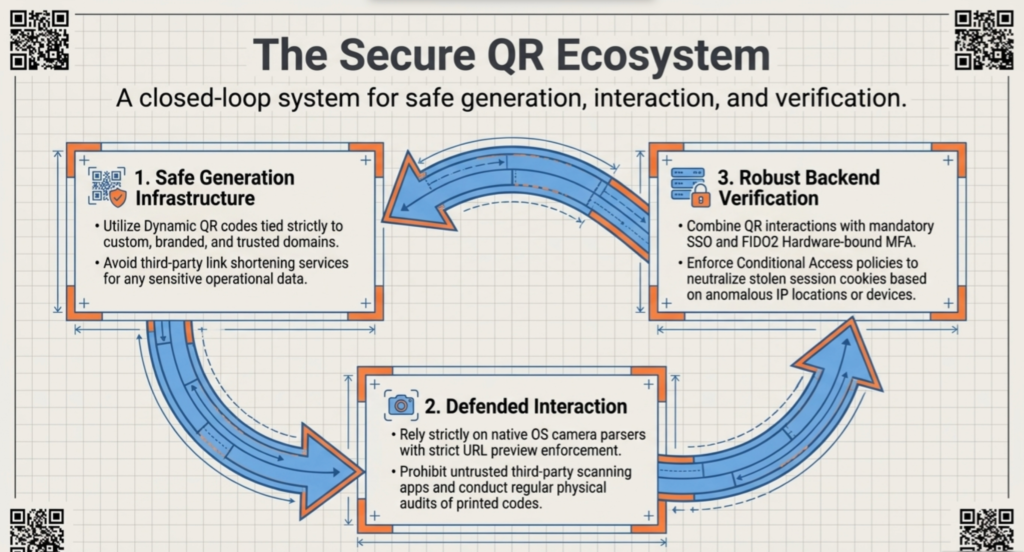
- Never encode sensitive data: Don’t put passwords, API keys, or personally identifiable information in QR codes.
- Use dynamic QR codes: Generate unique codes that expire after single use or time periods.
- Implement server-side validation: Verify QR code authenticity and permissions on the backend.
- Use HTTPS for URLs: Always redirect to an encrypted connection.
- Bind codes to sessions: Associate QR codes with specific user sessions to prevent replay attacks.
- Implement MFA/SSO: Combine QR authentication with stronger authentication methods.
- Input sanitization: Validate and sanitize all data extracted from QR codes before using it.
QR Code Standards: ISO/IEC 18004
QR code specifications are governed by the international standard ISO/IEC 18004:2024, which was updated in 2024. This standard ensures interoperability across different QR code generators and readers worldwide.
Key Specifications
Formats:
- Standard QR Code: Versions 1-40 (21×21 to 177×177 modules)
- Micro QR Code: Versions M1-M4 (11×11 to 17×17 modules) for space-constrained applications
Data Capacities (Maximum at Version 40, Level L):
- Numeric: 7,089 characters
- Alphanumeric: 4,296 characters
- Byte: 2,953 bytes
- Kanji: 1,817 characters
Error Correction Levels:
- L: 7% error recovery
- M: 15% error recovery
- Q: 25% error recovery
- H: 30% error recovery
Character Encoding:
- Numeric (0-9)
- Alphanumeric (0-9, A-Z, space, $, %, *, +, -, ., /, 🙂
- Byte (8-bit characters, including lowercase, special characters)
- Kanji (Japanese characters via Shift JIS encoding)
Advanced Topics and Future Directions
Color QR Codes
Researchers are developing color QR codes using RGB channels instead of monochrome. By assigning distinct values to red, green, and blue, these codes can theoretically triple data capacity within the same area.
Animated QR Codes
Advanced animated QR codes show dynamic content based on user context or scan time, increasing interactivity.
Conclusion
QR codes are more than just black-and-white squares; they’re connecting our physical world to the digital one. Since their start in 1994, they’ve evolved from simple manufacturing tracking tools to a global standard for everything from payments to healthcare. Whether you’re a developer or just a curious user, understanding the tech—like how they fix errors or store data—lets you understand and use them better.
Additional Resources
Official Standards:
- QR Code Specification
- – Official international standard for QR codes
- Denso Wave QR Code Documentation
- – Original inventor’s detailed specifications
Libraries and Tools:
- QRCode.js
- – JavaScript QR code generator library
- Python qrcode
- – Simple and elegant Python library
- Google ML Kit Barcode Scanning
- – Android/iOS barcode scanning
- ZBar Library
- – C library for barcode scanning
Educational Resources:
- Baeldung – How QR Codes Work
- – Computer science tutorial
- QR Code Chimp – Technical Guide
- – Comprehensive guides and tools
- ScanAva – QR Code Structure
- – Detailed structure breakdown
Security Resources:
- Duke University – QR Code Security Guide
- – Security best practices
- Bitly QR Code Security
- – Real-world vulnerability analysis
- SecurityHQ – QR Code Vulnerabilities
- – Current threat landscape
Real-World Applications:
- Stripe – QR Code Payments Guide
- – Payment integration strategies
- Supply Chain Management with QR Codes
- – Logistics applications
SEO Keywords: QR codes, barcode technology, 2D barcodes, data encoding, error correction, Reed-Solomon algorithm, mobile scanning, QR code generation, QR code security, dynamic QR codes, payment codes, supply chain tracking, authentication, QR code standards, ISO/IEC 18004, Quick Response codes, matrix barcodes